Programming Objects
A PXL host application can use the typed Launcher interface or manage the runtime objects explicitly. Launcher is the shorter path for single-source __pxl_kernel__ programs. The explicit object path gives the application direct control over Context, Job, Module, Function, and Map lifetimes.
Typed Launcher path

__pxl_kernel__ function  →  Launcher::execute() / stage()
                                      └─ tasks() → run() / runAsync()

Explicit object path

pxl::createContext()  →  Context
        └─ createJob()           →  Job
                  └─ load(module) / buildMap(...)

pxl::createModule(path)  →  Module
        └─ createFunction(name)  →  Function
Both paths use the same task-distribution and argument model. See Kernel Execution for the Launcher and Map execution flows. Stream is covered in Streams.
Launcher
pxl::Launcher is a high-level, typed interface for kernels compiled with pxcc. The host names a kernel by its C++ symbol and passes the original device pointer or pxl::NDArray; Launcher selects the device from those arguments and configures the underlying execution objects.
__pxl_kernel__ void add_one(int* data)
{
    data[mu::getTaskIdx()] += 1;
}

auto result = pxl::Launcher()
                  .execute<add_one>(data)
                  .tasks(taskCount)
                  .run();
execute() starts a single-kernel request. stage<kernel>() adds a sequential kernel; stage() without arguments opens a parallel group whose add<kernel>() calls add kernels to that group. See the sequential and parallel examples. With the request-scoped form shown above, each kernel entry must receive its task count through .tasks(taskCount) before it can run or continue to the next kernel. Launcher and its builders are ordinary C++ values and require no explicit destruction.
Use the explicit object API instead when the application needs to load a standalone .mubin, retain and reuse a Job or Map, or directly control Map lifecycle operations. See Kernel Execution for task configuration, directional pointer arguments, NDArray slicing, and multi-kernel execution.
Context
A Context is an execution session bound to a device. It owns device memory and is the factory for Jobs.
Responsibilities:
- Create and destroy
Jobs. - Allocate and free device memory.
- Query memory information of a pointer.
auto ctx = pxl::createContext();              // first available device
auto ctx0 = pxl::createContext(deviceId);     // specific device

// Device memory
auto ptr = ctx->memAlloc(size);
ctx->memFree(ptr);

// Job creation
auto job = ctx->createJob(numSub);

pxl::destroyContext(ctx);
Reuse a single
Contextfor the lifetime of your application. Allocating device memory once at startup and reusing it across kernel launches avoids re-mapping device addresses on every launch, which would otherwise add latency to each call.
Job
A Job is a reservation of one or more Sub units. It loads a kernel binary and creates Map objects that run on those Subs.
Responsibilities:
- Hold a set of Subs (allocate more or release some at runtime).
- Load a
Moduleso the kernel binary lives on the Job’s Subs. - Build
Mapobjects that target functions in the loaded module. - Own a private default
Streamused by everyMapthat does not bind its own.
auto job = ctx->createJob(4);          // 4 Subs
job->load("mu_kernel.mubin");          // load by path
// or: job->load(module);              // load a pre-created Module

job->subAlloc(2);                      // request 2 more Subs
auto subIds = job->subIdList();        // inspect what was assigned

auto map = job->buildMap("my_kernel", taskCount);

ctx->destroyJob(job);
Destroying a Job synchronously drains every
Mapbuilt from it, so it is safe to call even when asynchronous executions are still in flight.
Module and Function
A Module is a compiled MU kernel binary. A Function is a single host-callable entry point inside that module.
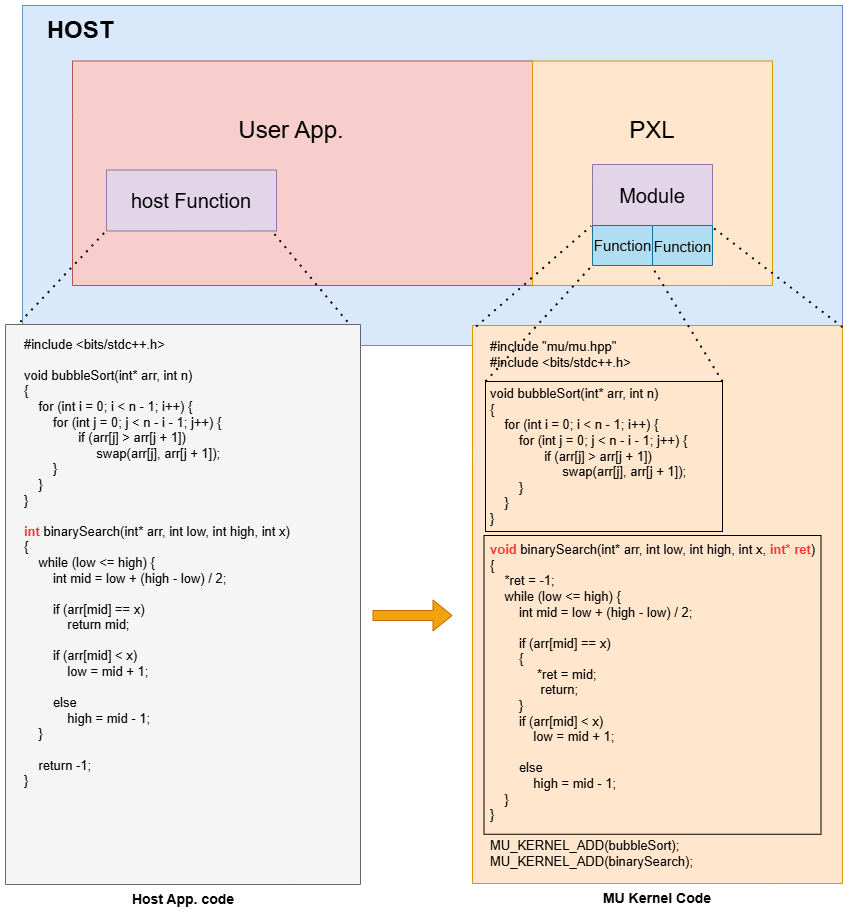
auto module = pxl::createModule("mu_kernel.mubin");

auto sortFunc   = module->createFunction("bubbleSort");
auto searchFunc = module->createFunction("binarySearch");

// Inspect the module
auto names = module->getMuFunctionList();
auto count = module->getNumMuFunctions();

pxl::destroyModule(module);
A Module can be loaded into a Job with job->load(module). The Job’s Subs then hold the binary, so buildMap(funcName, ...) can resolve function names against it.
Lifecycle Summary
Launcher and its builders have automatic C++ lifetimes. The table below covers the explicit runtime objects that an application may retain and reuse.
| Object | Created by | Destroyed by | Owns |
|---|---|---|---|
Context | pxl::createContext() | pxl::destroyContext() | device memory, Jobs |
Job | Context::createJob() | Context::destroyJob() | Subs, default Stream, Maps |
Module | pxl::createModule() | pxl::destroyModule() | binary image, Functions |
Function | Module::createFunction() | Module::destroyFunction() | (handle only) |
Map | Job::buildMap() | Job::destroyMap() | argument bindings, stream binding |
Destroying a parent object releases its children, so you typically only need to destroy the top-level objects (Context, Module). Explicit child destruction is supported for cases where you want to free resources earlier.
→ Related: Kernel Execution, Streams